~/project/provent.md
Provent
A productivity Chrome extension
- Timeline
- January 2022 - April 2024
- Type
- Startup
- Team
- Donald Lee, with Grace Zhou
- My role
- Technical Co-founder
## overview
Provent is a Chrome extension that replaces your new tab with a clean workspace, adds a pomodoro timer, and blocks distracting websites while you're supposed to be working.
- downloads on the Chrome Web Store
- 700+downloads on the Chrome Web Store
- beta testers
- 75beta testers
- extensions: Provent, and Provent Zero for people who like their new tab
- 2extensions: Provent, and Provent Zero for people who like their new tab
## why-i-built-it
Why I built it
During the pandemic, school moved online, so I was on my laptop all day. That made it really easy to end up on YouTube or Reddit when I was supposed to be doing homework.
I installed Momentum, which makes your new tab look nicer, and Forest, which blocks sites while a timer runs. Neither really worked for me. The pomodoro timer on Momentum was paid, and I was usually too lazy to turn Forest on in the first place. A year earlier I'd also built Focomend, an extension that hid YouTube recommendations, but it was laggy and hard to maintain, so I never released it.
So I decided to combine the two into one extension that fit how I actually studied, with a blocker that turns itself on when you start working. I started building this in my last semester of high school, and it became my capstone project.
## finding-a-co-founder
Finding a co-founder
I started by designing the extension myself, because I'd learned from past projects that coding without a design means recoding everything later. I got feedback from designer friends I met volunteering at Youth Helping Youth, applied it, and started building. A few weeks in, I realized the design still wasn't good.
Design and marketing aren't my strengths, and I didn't want to spend months getting good at them. So I reached out to a friend, who I also met through Youth Helping Youth and who was studying Business and Computer Science at Western. After I explained the idea, she joined as my co-founder. She designed the extension and the website in Figma, and led branding and marketing. I wrote all the code.
One of the first things we changed was the look. My first version looked a lot like Momentum, so we rebranded to make Provent its own thing instead of a copy of something people already had.
## what-it-does
What it does
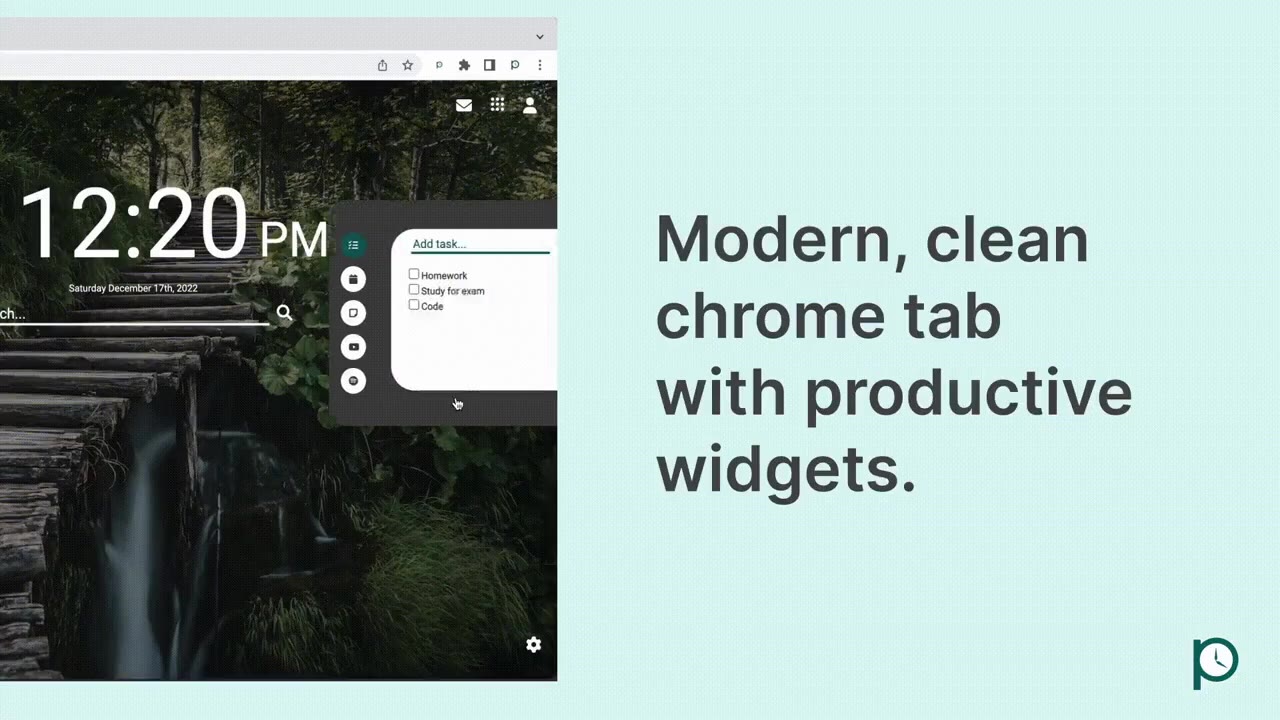
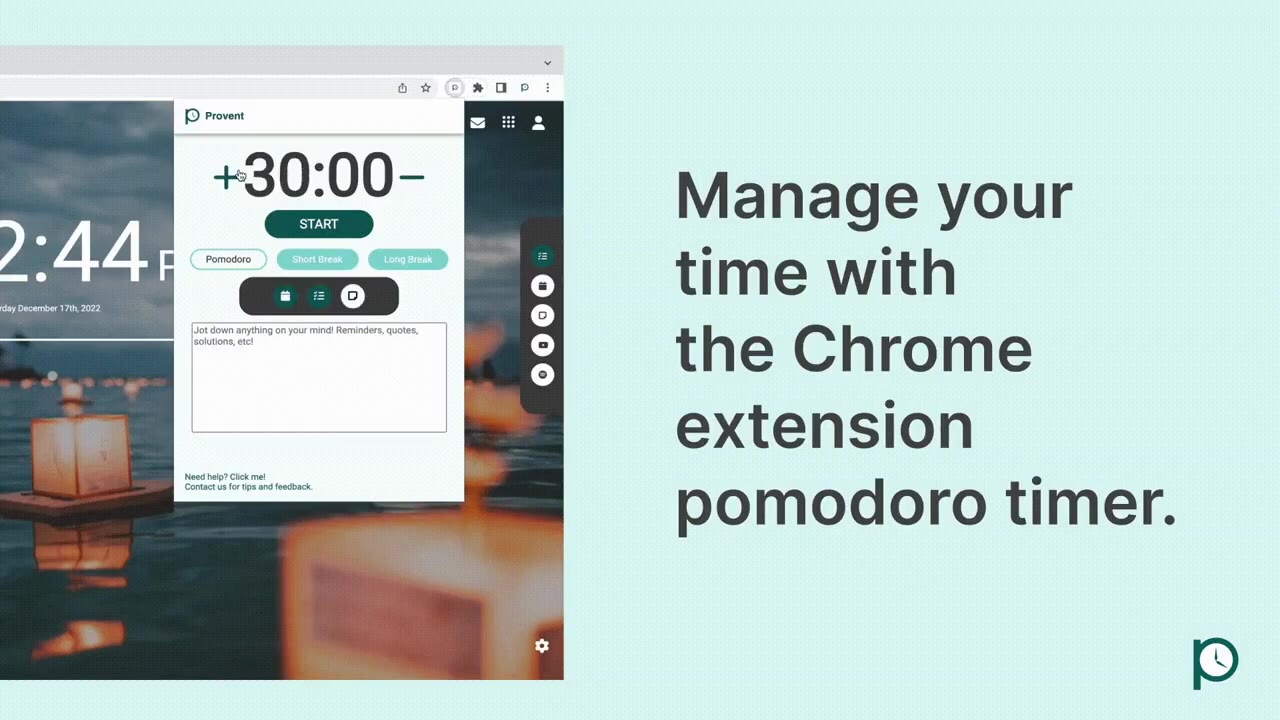
When you open a new tab, you get a calm background, the time, a search bar, and widgets for things you actually need: a to-do list, notes, your Google Calendar, and Spotify and YouTube for your study playlist. The pomodoro timer is one click away in the toolbar.
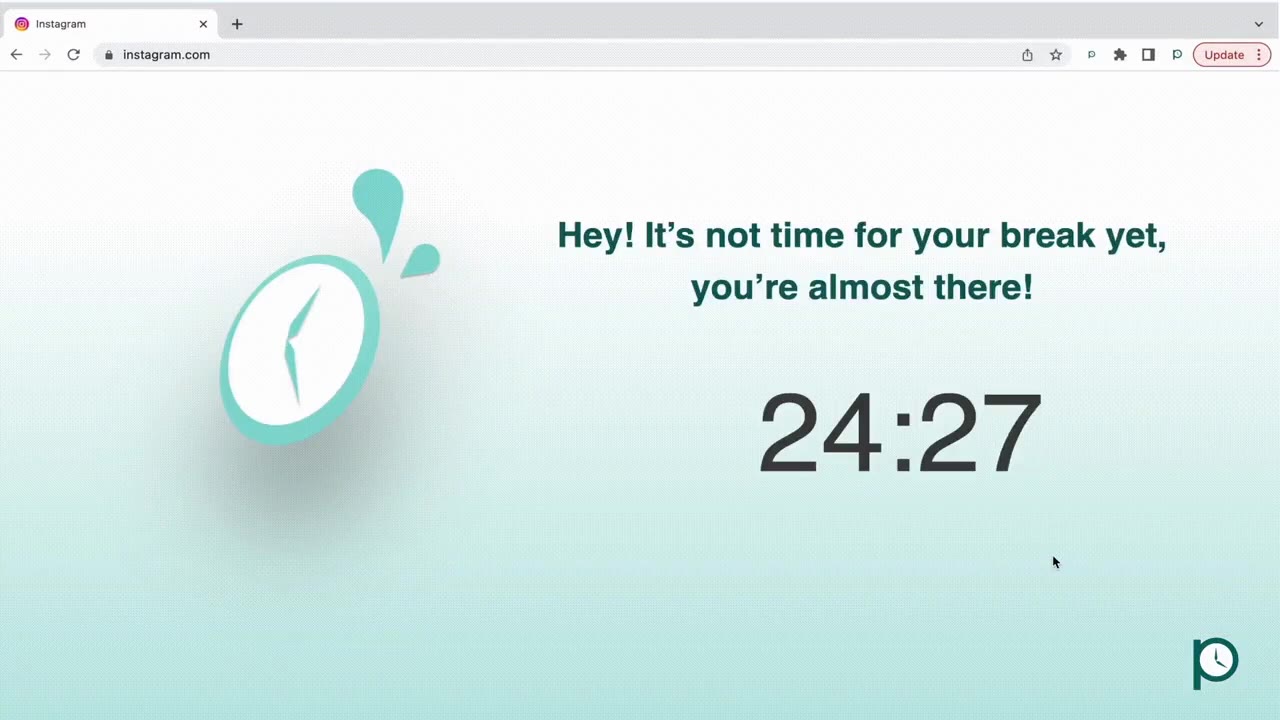
The site blocker only works while the timer is running. Most blockers are always on, so you end up turning them off and forgetting to turn them back on. I tied the blocker to the timer so it turns itself on when you start focusing and off when your break starts. If you open a blocked site during a focus session, you see how much time is left, with your own custom message if you want one.
## keeping-the-timer-in-sync
Keeping the timer in sync
Even with Focomend behind me, I had to relearn a lot. Google had just moved new extensions to Manifest V3, which changed how they're set up for security reasons, so I spent a lot of time in the docs and on Stack Overflow.
The hardest part was keeping data the same everywhere. The timer lives in a lot of places at once: the toolbar popup, every new tab, and every website you have open, since that's where the blocker runs. If you start a session in one place, all of them need to agree on how much time is left. The to-do list had the same problem between the new tab and the popup. At first, they kept getting out of sync.
There wasn't a clean built-in way to do this in Chrome extensions, so I changed what each page keeps track of. Instead of every page running its own countdown, Provent saves one thing when you start a session: the time it ends. Every page reads that one value from Chrome's storage and works out the time left by itself. Closing the popup, opening a new tab halfway through, or switching windows doesn't matter, because they're all doing the same math from the same number.
## a-blocker-that-gets-out-of-the-way
A blocker that gets out of the way
My first blocker wiped the page. During a focus session, it deleted everything on a distracting site. That worked, but when your break started, the site was still broken until you reloaded it, and anything you had open there, like a half-watched video, was gone.
So I rebuilt it as a layer on top of the page instead. A small script on each site checks every two seconds whether you're focusing. If you are, the layer covers the page. When your break starts, the layer goes away and the site is right where you left it. Being strict during focus is only half the job. The break has to feel like a break too.
## keeping-the-new-tab-fast
Keeping the new tab fast
A new tab page gets opened dozens of times a day, so it can't feel slow. The Google Calendar widget was the heaviest part, because it loads a full calendar from Google. I changed it so the calendar only loads when you actually open that widget, instead of on every new tab. Most new tabs never need it, so most new tabs got faster.
## launching-it
Launching it
Halfway through, I realized that no matter how good the extension was, not many people would find it if we didn't spend time marketing it. So we pushed the launch back from June, and I paused the extension to build our website from Grace's designs.
This was the first project I treated like a real product. We ran a beta with 75 testers, then I kept releasing updates on the Chrome Web Store based on what people asked for: timer notifications, a pre-made block list, offline backgrounds for when the internet goes down, a walkthrough for new users, and seasonal themes. Provent was also part of LOI Accelerator Labs Batch 11. Along with the extension, we made:
- A landing page, a changelog, a tutorial, and terms of service.
- An email list for launch updates.
- An uninstall survey, because it's hard to know why people leave unless you ask them.
## provent-zero
Provent Zero
Feedback told me something I didn't expect. A lot of people already had a new tab they liked, and replacing it was a reason to leave, even if they liked the timer and the blocker.
So I made Provent Zero, which is just the pomodoro timer and the site blocker, with a short tour for first-time users. Same product, just without the new tab.
## key-learnings
What I learned
- 01
Building features is the fun part. Getting people to find it, learn it, and stick with it is where most of the work is.
- 02
I don't have to be good at everything. Finding a co-founder who was great at design and marketing let me spend my time on the code.
- 03
Small teams move fast. With two of us, we both always knew what was going on, and new ideas didn't have to go through a bunch of people before we tried them.
## built-with
Languages
- JavaScript
- HTML
- CSS
Platform
- Chrome Extensions (Manifest V3)
- chrome.storage
Launch
- GitHub Pages
- Google Analytics
- Google Forms
- Product Hunt
## next-project
Climate Change, Visualized
Climate change, in 3D
read the write-up